Subscribe to receive our daily tech reviews
Lorem ipsum dolor sit amet, consectetur adipiscing elit ut liqua purus sit amet luctus venenatis, lectus magna.




Tips for Designing Engaging Email Newsletters
Design email newsletters that captivate your audience! From clean layouts to mobile optimization, these tips will help boost engagement and drive results.
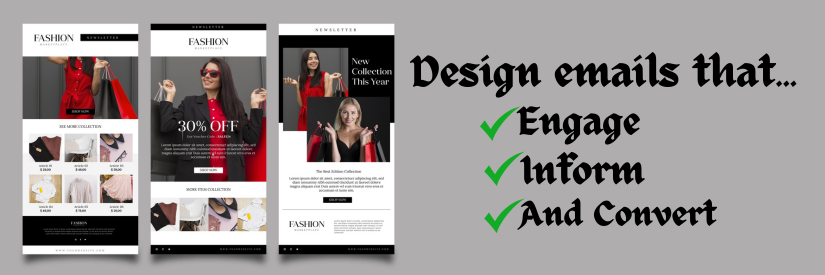
Email newsletters are a powerful tool for small businesses looking to build strong relationships with their audience. But to make the most of this medium, the design of your newsletter needs to captivate readers from the moment they open it. Whether you’re sharing updates, promoting products, or offering insights, an engaging design can make all the difference in how your message is received; here are some practical tips for designing email newsletters that look great and drive results.
1. Prioritise a Clean and Simple Layout
A cluttered email can overwhelm readers and dilute your message. Instead, focus on a clean and straightforward layout that naturally guides the reader’s eye through the content. Use plenty of white space to separate different sections, making the newsletter easier to scan. Tools like Stripo and BEE Pro offer a range of templates to help you achieve a well-organized layout without much effort. These platforms allow you to customise templates to suit your brand while ensuring the design remains user-friendly and visually appealing.
2. Make Your Call to Action Stand Out
Every email newsletter should have a clear call to action (CTA), encouraging readers to visit your website, purchase, or read more on a specific topic. To ensure your CTA gets noticed, strategically place contrasting colours within your newsletter. It’s also helpful to keep the text concise and action-oriented, such as “Shop Now” or “Learn More.” A well-designed CTA can significantly improve click-through rates and overall engagement.
3. Use High-Quality Images Sparingly
Images can enhance the appeal of your email newsletter, but overloading it with visuals can slow down loading times and distract from your message. Choose high-quality photos supporting your content and ensure they are optimised for email. Canva is an excellent resource for creating eye-catching visuals, whether you need a product image or a custom graphic. Remember that all images should have alt text, so if they don’t load, your readers still understand the context.
4. Keep Text Readable and Engaging
The text in your email newsletter should be easy to read and engaging. Use a legible font size and typeface that aligns with your brand’s identity. Breaking your text into short paragraphs, bullet points, and subheadings can make the content more digestible. Avoid long blocks of text that might cause readers to lose interest. If you’re using a service like Mailchimp, use their text formatting options to ensure your content is readable and visually appealing.
5. Incorporate Your Brand’s Identity
Your email newsletter should reflect your brand’s personality and values. This can be achieved by consistently using brand colours, fonts, and logos. It’s essential that readers can immediately recognise your brand when they open your newsletter. Stripo and BEE Pro allow easy customisation to ensure your emails stay true to your brand’s look and feel. This consistency helps build brand recognition and fosters trust among your audience.
6. Optimise for Mobile Devices
With many emails being opened on mobile devices, optimising your email newsletters for smaller screens is critical. This means using a responsive design that adjusts automatically to different screen sizes, ensuring your content remains accessible and visually appealing on smartphones and tablets. Tools like Mailchimp offer mobile previews, allowing you to see how your newsletter will appear on various devices before sending it out.
7. Personalise Your Content
Personalisation can significantly enhance the effectiveness of your email newsletters. Addressing recipients by their first name or tailoring content based on their past interactions with your brand can make your emails more relevant and engaging. Mailchimp and BEE Pro offer personalisation options that allow you to segment your audience and customise content to match their preferences. This approach can lead to higher open rates and stronger customer loyalty.
8. Test and Refine Your Design
The best way to ensure your email newsletter design is effective is by testing it. A/B testing different elements, such as subject lines, images, and CTA placement, can provide valuable insights into what resonates with your audience. Stripo and Mailchimp offer A/B testing features that allow you to compare different newsletter versions and make data-driven decisions to optimise performance.
Pro Tip: Regularly reviewing email analytics can help you identify patterns and trends that inform future design decisions. Pay attention to metrics like open rates, click-through rates, and unsubscribe rates to gauge the effectiveness of your newsletters.
9. Keep Accessibility in Mind
Accessibility should be a key consideration when designing email newsletters. This means ensuring that your emails are easy to navigate for all users, including those with disabilities. Use descriptive alt text for images, maintain high colour contrast, and ensure your text is large enough to read comfortably. Tools like Canva offer accessibility features that help you create inclusive and user-friendly content.
10. Stay Consistent with Sending Schedules
Finally, consistency is crucial when it comes to email newsletters. Establish a regular sending schedule that your audience can expect, whether weekly, bi-weekly, or monthly. Consistency helps build anticipation and keeps your brand top-of-mind. Tools like Mailchimp allow you to automate your email campaigns, ensuring your newsletters go out on time every time.
Pro Tip: Create an email marketing calendar to track your newsletter schedules, themes, and content. This can help you stay organised and ensure your newsletters align with your marketing goals.
Key Takeaways
Designing an engaging email newsletter is more than aesthetics; it’s about connecting with your audience. By focusing on a clean layout, clear CTAs, and personalised content, you can enhance your email campaigns and foster stronger customer relationships. Tools like Stripo, BEE Pro, Canva, and Mailchimp offer a range of features that can help you craft newsletters that look great and deliver results. Remember, the key to success is in the details—test your designs, optimise for mobile, and keep accessibility at the forefront. With these tips, you’re well on creating email newsletters that engage, inform, and convert.